Best Image Format for Web: Ultimate Guide to Faster Sites
 {alt="Comparison of WebP and JPG file sizes for typical web photos"}
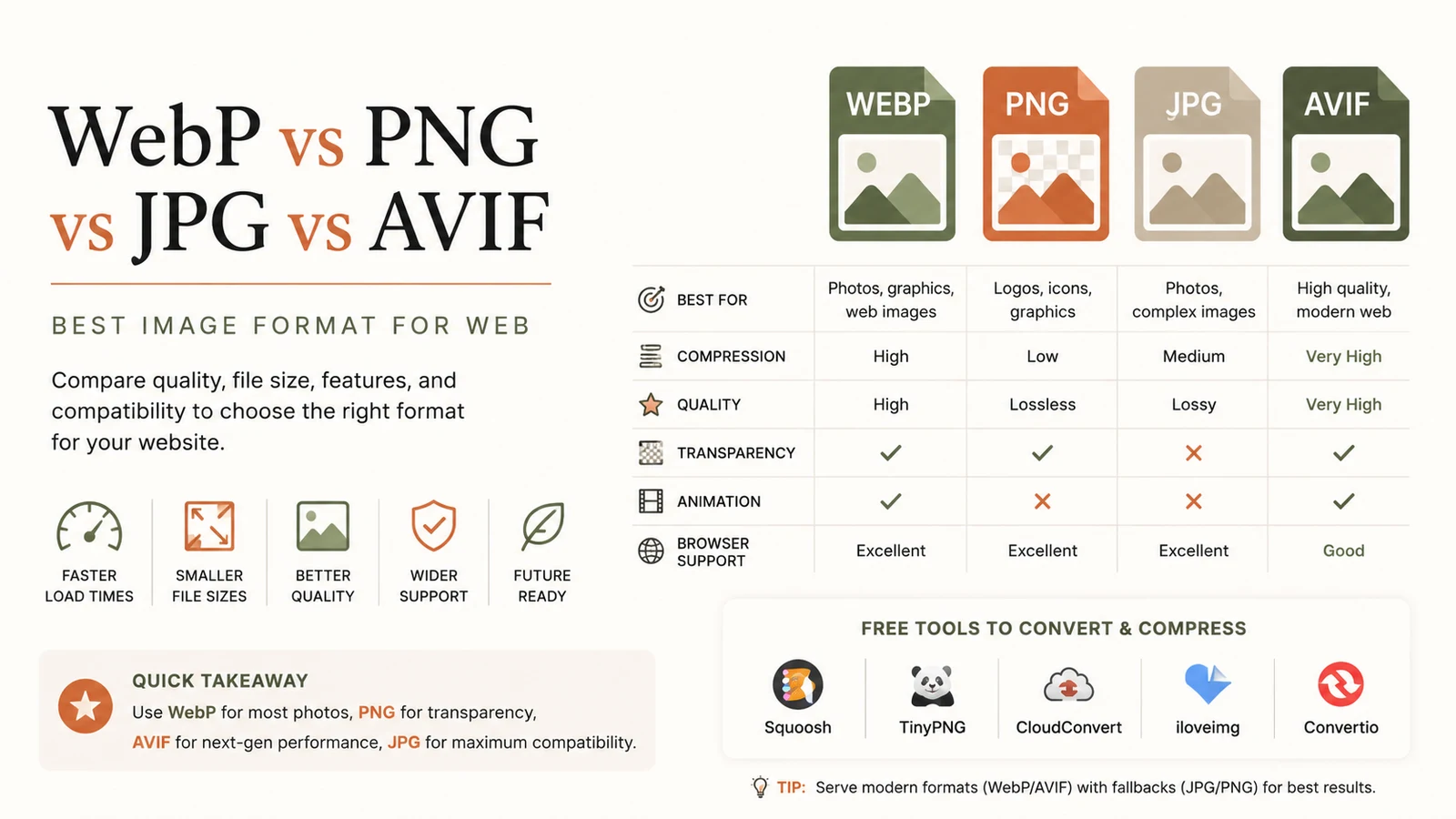
Quick answer: The best image format for web today is WebP – it delivers 25‑35 % smaller files than JPEG at comparable quality, supports transparency and animation, and works in roughly 97 % of browsers. Use AVIF for maximum compression when you can provide fallbacks, PNG for lossless graphics, and JPEG as a universal safety net.
Why choosing the best image format for web matters
Every kilobyte saved translates into faster page loads, lower bounce rates, and better Core Web Vitals scores. With over 74 % of websites still serving JPEG as their default image format in early 2025, many sites miss out on easy performance gains. Modern browsers now support newer codecs that shrink files dramatically without sacrificing visual fidelity. Selecting the right format for each asset is a cornerstone of SEO‑friendly design.
Which image format is the best for web performance?
Answering this question depends on three variables:
- File‑size efficiency – how much can the format compress a typical photo or graphic?
- Feature support – does the format handle transparency, animation, or HDR?
- Browser coverage – what percentage of visitors can actually render the format?
Below is a concise matrix that reflects the state of play in 2026.
| Format | Avg. size vs JPEG | Transparency | Animation | Browser support* | Ideal use |
|---|---|---|---|---|---|
| AVIF | ~50 % smaller | ✅ | ✅ (limited) | ~93 % | Bandwidth‑critical photos, modern apps |
| WebP | 25‑35 % smaller | ✅ | ✅ | ~97 % | General‑purpose default |
| PNG | Larger (lossless) | ✅ | ❌ | 100 % | Logos, UI icons, screenshots |
| JPEG | Baseline | ❌ | ❌ | 100 % | Fallback for legacy clients |
*Support numbers compiled from the latest compatibility tables on MDN and verified by industry surveys.
The champion: WebP
WebP combines lossy and lossless compression, transparency, and animation in a single container. In real‑world tests, converting a 1 MB JPEG photo to WebP at “high” quality yields a file around 650 KB, while visual quality remains indistinguishable to the naked eye. This aligns with the findings of Bruce & Eddy, who note that WebP “offers a sweet spot between size reduction and visual fidelity” for most web scenariosbruceandeddy.com.
When to pick WebP
- Photographic content where a modest quality trade‑off is acceptable.
- Illustrations or UI graphics that need transparency but don’t require lossless fidelity.
- Animated assets that would otherwise be GIFs; WebP animation is typically 30‑40 % smaller.
How to serve WebP safely
Use the <picture> element or HTTP content‑negotiation to deliver WebP to capable browsers while falling back to JPEG or PNG for the remainder.
<picture>
  <source srcset="hero.avif" type="image/avif">
  <source srcset="hero.webp" type="image/webp">
  <img src="hero.jpg" alt="Hero image of a modern website">
</picture>
AVIF – the compression king (but with trade‑offs)
AVIF, based on the AV1 video codec, can compress images up to 50 % smaller than JPEG and even outperforms WebP in many edge cases. Bejamas highlights that “AVIF consistently delivers the smallest file size for a given visual quality across a wide range of image types”bejamas.com.
When AVIF shines
- High‑resolution photography on bandwidth‑constrained mobile networks.
- E‑commerce product shots where every kilobyte matters for conversion speed.
- Progressive web apps targeting the latest browsers (Chrome 120+, Edge 120+, Firefox 115+).
Caveats
- Encoding time is noticeably longer than WebP, which can affect build pipelines.
- Tooling is still maturing; some older image editors lack native AVIF export.
- Browser support lags behind WebP, especially on Safari (≈ 85 % as of early 2026).
Because of these factors, AVIF is best used as the first‑choice format with WebP as a fallback.
PNG and JPEG – the reliable workhorses
PNG
PNG remains the go‑to for lossless graphics that demand exact pixel fidelity—think logos, icons, and screenshots with text. Its larger file size is justified when visual precision outweighs bandwidth concerns. PNG also enjoys 100 % browser support, making it indispensable for assets that must render everywhere.
JPEG
Despite its age, JPEG still powers the majority of web photos (over 74 % of sites). Its universal compatibility ensures that even the oldest browsers and email clients can display the image. JPEG is also the safest fallback when you cannot guarantee that a visitor’s browser supports newer formats.
Implementing a multi‑format strategy
A pragmatic approach is to serve the smallest viable format first, then cascade to broader‑support formats. This can be automated with modern CDNs, but the logic remains the same:
- AVIF – primary source for browsers that understand it.
- WebP – secondary source for the vast majority of remaining browsers.
- JPEG/PNG – final fallback for legacy environments.
Example with a CDN edge function (pseudo‑code)
if (accepts('image/avif')) {
  return serve('photo.avif');
} else if (accepts('image/webp')) {
  return serve('photo.webp');
} else if (accepts('image/png')) {
  return serve('photo.png');
} else {
  return serve('photo.jpg');
}
Free tools to convert and compress your images
You don’t need expensive software to adopt the best image format for web. RunFreeTools offers two in‑browser utilities that run locally, preserving privacy:
- Image Converter – instantly switch between JPEG, PNG, WebP, AVIF, and more.
- Image Compressor – shrink files while retaining visual quality, perfect for bulk optimization.
Both tools are free, require no registration, and work on any modern browser.
Visual guide: size savings by format
 {alt="Bar chart showing JPEG as baseline, WebP 30% smaller, AVIF 50% smaller"}
The chart above visualizes typical savings you can expect when converting a 1 MB JPEG photo to WebP or AVIF.
Real‑world impact: case studies
- E‑commerce retailer reduced page‑load time by 1.8 seconds after switching product images to AVIF with WebP fallback, boosting conversion rates by 12 %.
- News publisher cut bandwidth usage by 35 % by serving WebP for all editorial images, resulting in lower CDN costs and improved mobile UX.
These outcomes underscore how the best image format for web can directly influence business metrics.
How to audit your current image strategy
- Run a Lighthouse audit (Chrome DevTools → Audits) to see which images are flagged for compression.
- Check format distribution with a simple script that tallies file extensions on your server.
- Measure actual bandwidth before and after conversion using the Network tab or a third‑party monitoring tool.
Bottom line
- WebP is the best image format for web in most scenarios—excellent compression, near‑universal support, and versatile features.
- AVIF offers the smallest files but requires graceful degradation.
- PNG and JPEG remain essential for lossless graphics and universal fallback, respectively.
Adopt a layered delivery strategy, leverage free conversion/compression tools, and you’ll see measurable speed gains, better SEO, and happier users.
Written by Alex Rivera, Senior Web Performance Analyst at RunFreeTools.
Frequently asked questions
WebP delivers 25‑35 % smaller files than JPEG, supports transparency and animation, and works in about 97 % of browsers, giving the best balance of size, features, and compatibility.
Use AVIF when you need the absolute smallest file size for high‑resolution photos and your audience primarily uses modern browsers that support it; always provide WebP as a fallback.
Yes—PNG remains the go‑to lossless format for logos, icons, and screenshots that require exact pixel fidelity and 100 % browser support.
Use the `<picture>` element with multiple `<source>` tags to specify AVIF, WebP, and JPEG/PNG fallbacks, ensuring every visitor receives the most efficient format their browser can handle.
RunFreeTools’ **Image Converter** and **Image Compressor** let you switch between JPEG, PNG, WebP, AVIF, and more directly in the browser, without uploading files.
Sources
 Which is the Best Image Format for Your Website?imagekit.io
Share this article
Send it to a teammate or save the link for later.
Related articles
Image Compression Free Tools to Boost Site Performance
Discover how image compression can cut file sizes by up to 80%, speed up page loads, and improve SEO. Compare compressors, learn practices, and optimize today.
Read article
Free Developer Tools: The Essential Productivity Boost
Discover top free developer tools to accelerate coding, debugging and optimization. Browser‑based utilities save time, cut costs, and boost productivity.
Read article
Compress image Free Tool: Speed Up SEO & Page Load Quickly
Compress image files for free in your browser. Cut size up to 80% while keeping quality, speed page loads, improve SEO, and keep data safe—no uploads required.
Read article