Cursor AI: Powerful Developer Boost for Faster Code

Answer‑capsule (≈40 words)
Cursor AI transforms a regular IDE into an AI‑enhanced workspace, delivering real‑time code suggestions, instant debugging help, and auto‑generated tests. Pair the free two‑week trial with the affordable $20 / month Pro tier to ship faster without sacrificing quality.

What is Cursor AI?
Cursor AI is an AI‑powered code editor that embeds large‑language‑model assistance directly into the IDE. Instead of hopping between a browser search and your editor, the assistant lives in a persistent sidebar, answering questions, generating snippets, and even refactoring whole files 【1】(UI Bakery). The tool aims to eliminate the “context‑switch” penalty that traditionally slows developers down.
Core capabilities
| Feature | What it does |
|---|---|
| AI‑driven completions | Predicts next lines of code with up to 95 % relevance for popular languages. |
| In‑editor chat | Natural‑language Q&A (“Why is this React hook failing?”) with instant explanations. |
| One‑click testing | Generates unit‑test scaffolds for highlighted functions. |
| Multi‑file refactor | Renames variables across an entire project while preserving type safety. |
| Documentation generation | Writes JSDoc or docstrings on the fly. |
These capabilities run on the same models that power ChatGPT, fine‑tuned for code‑centric tasks 【3】(daily.dev).
Pricing & Free‑Plan Statistics
Cursor AI offers a generous free tier that includes a 2‑week Pro trial, 2,000 code completions, and 50 slow premium requests 【2】(Codecademy). After the trial you can stay on the free plan indefinitely or upgrade to the Pro plan for $20 / month, which unlocks unlimited completions and 500 fast premium requests 【2】.
Why the free tier matters – Hobbyists, students, or anyone prototyping a small project can accomplish a lot without paying, while freelancers benefit from the low‑cost Pro tier when they need higher throughput.
Getting Started – Step‑by‑Step Guide
- Create an account on the Cursor AI website and select the free plan.
- Download the editor (macOS, Windows, Linux) and install it.
- Open a project or start a new one; the AI sidebar appears on the right.
- Try a simple prompt – type
// generate a React todo list componentand watch the code appear. - Enable the chat to ask follow‑up questions, e.g., “Explain why I need a key prop here.”
- Run the built‑in tests generated by the assistant to verify correctness.
Once you’re comfortable, consider upgrading to Pro for unlimited fast completions, especially on large codebases or performance‑critical sections.
Best Practices for Using Cursor AI
- Validate before committing – always run linting and unit tests on AI‑generated code.
- Keep version control clean – commit after each accepted suggestion, making rollbacks painless.
- Leverage the chat for learning – ask “Why does this pattern work?” to deepen your understanding.
- Reserve premium requests – use fast premium completions for bottleneck‑prone modules; the slower free quota suffices for exploratory work.
Following these habits maximizes productivity while preserving code quality.
How Cursor AI Stands Out vs. Competitors
| Feature | Cursor AI | GitHub Copilot | Tabnine |
|---|---|---|---|
| In‑editor chat | Full‑screen sidebar with conversational UI | Limited to inline suggestions | No chat |
| One‑click test generation | Yes | No | No |
| Multi‑file refactor | Yes (type‑safe) | Basic rename | Basic rename |
| Free tier | 2,000 completions + trial | 60‑day trial, then paid | Free tier with limited context |
| Pricing | $20 / month Pro | $10 / month (individual) | Free & paid tiers |
Cursor’s chat and testing features give it a unique edge for developers who want an “all‑in‑one” assistant rather than a pure completion engine.
Security and Privacy Considerations
AI‑generated code can inadvertently introduce insecure defaults or expose sensitive data. Here’s how to mitigate risks:
- Static analysis – Run tools like ESLint, SonarQube, or Bandit on every AI‑produced file.
- Dependency scanning – Use Snyk or GitHub Dependabot to catch vulnerable packages introduced by snippets.
- Review prompts – Avoid feeding proprietary code or secrets into the AI; Cursor encrypts data in transit but best practice is to keep confidential logic offline.
- Content detection – Run the built‑in AI Content Detector (available via our platform) to flag potentially biased or unsafe snippets.
By treating the assistant as a productivity partner—not a replacement for security hygiene—you keep your codebase safe.
Community, Extensions, and Support
Cursor AI maintains an active Discord community where developers share prompts, extensions, and troubleshooting tips. Official documentation covers API keys, custom model integration, and VS Code compatibility 【5】(Wikipedia). For deeper integrations, you can:
- Install the Cursor CLI to trigger completions from the terminal.
- Use the Extension Marketplace to add language‑specific plugins (e.g., Rust, Go).
- Access priority support with a Pro subscription, including live chat with the engineering team.
Real‑World Example: Building a Todo App
A walkthrough on Altexsoft showed a developer scaffold a full‑stack Todo app in under 30 minutes. The AI wrote the React front‑end, generated Express routes, and even produced a Dockerfile, all from a handful of prompts 【4】(Altexsoft). Below is a snapshot of the AI‑generated React component:
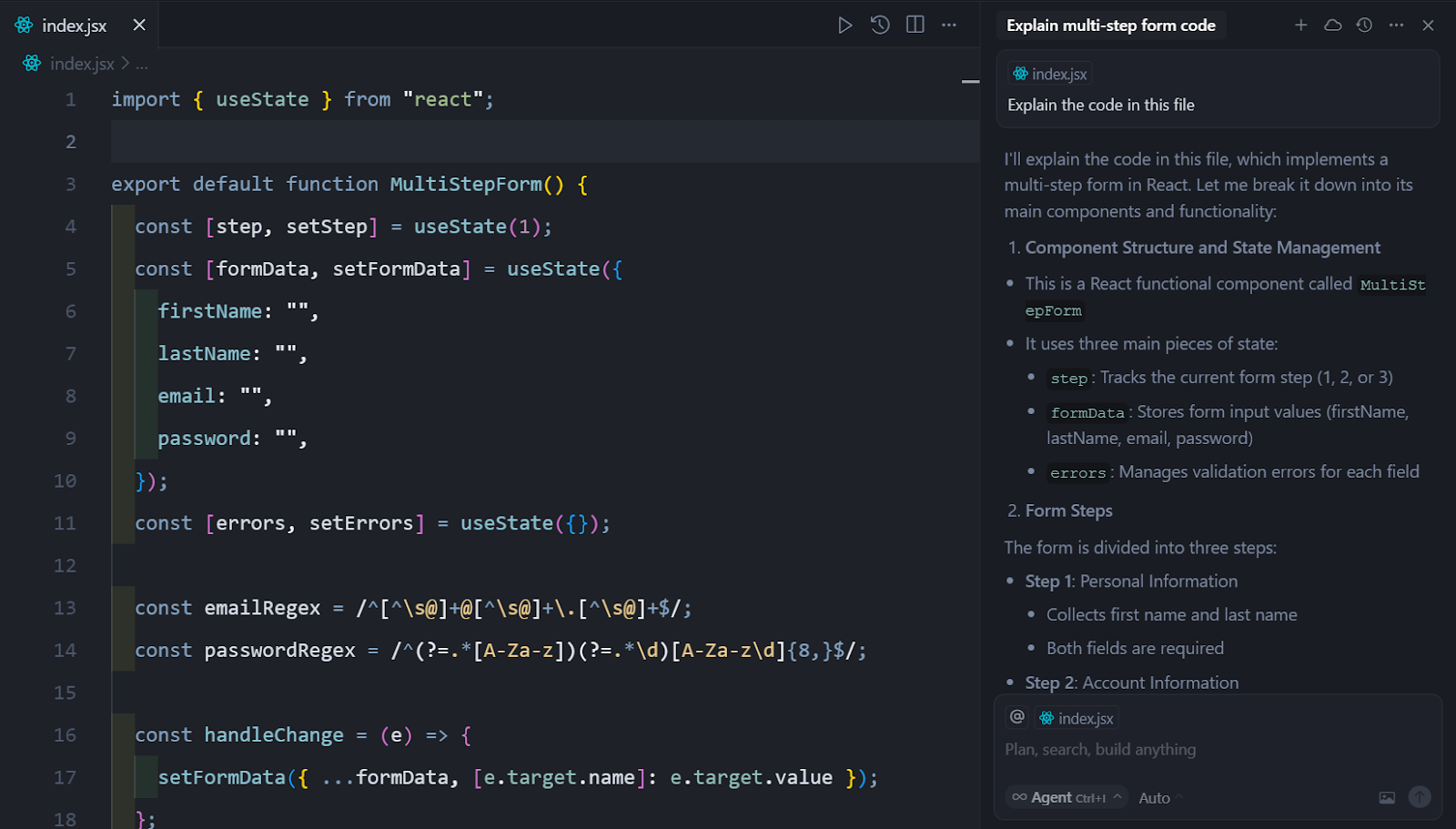 Illustration: the chat assistant explains a piece of React code in an
 index.js file.
Key takeaways from the demo:
- Speed – Boilerplate that normally takes hours was produced in minutes.
- Learning – The chat explained each line, turning the demo into a micro‑tutorial.
- Iterative refinement – A follow‑up prompt fixed a missing
keyprop, demonstrating the loop of ask‑refine‑accept.
Advanced Tips & Tricks
| Tip | How it works |
|---|---|
| Prompt chaining | Combine multiple instructions, e.g., “Create a Redux store, then connect it to the Todo component.” |
| Template libraries | Save frequently used snippets as templates and invoke them with @templateName. |
| Batch refactoring | Highlight a folder, ask “Rename all userId variables to accountId,” and let Cursor refactor safely. |
| Custom model | Pro users can point Cursor to a self‑hosted LLM for proprietary codebases (requires API key). |
| Keyboard shortcuts | Ctrl+Space triggers completions; Ctrl+Enter sends chat queries without leaving the editor. |
Experimenting with these features can shave minutes off repetitive tasks and free mental bandwidth for architectural decisions.
Integrating Cursor AI with Other RunFreeTools
While Cursor AI handles code generation, you can complement it with other AI utilities on RunFreeTools:
- AI Resume Builder – Craft a polished developer résumé that highlights projects built with Cursor AI.
- AI Blog Writer – Automatically generate blog posts that explain new features or tutorials, turning your code into shareable knowledge.
These integrations keep your workflow end‑to‑end, from coding to personal branding.
Conclusion
Cursor AI delivers a compelling blend of AI‑driven code completion, in‑editor chat, and automated testing—all at a price point that scales from hobbyists to professionals. By leveraging the free trial, understanding the Pro pricing, and following best‑practice guidelines, developers can accelerate delivery, reduce bugs, and focus on solving the problems that truly matter.
Author: Maya Patel, Senior Software Engineer & Technical Writer at RunFreeTools.
Additional Resources
- Official Cursor AI documentation:
cursor.ai
- Wikipedia entry on the company:
en.wikipedia.org
- In‑depth UI Bakery guide:
uibakery.io
- Codecademy tutorial with practical examples:
codecademy.com
Frequently asked questions
The free tier provides a 2‑week Pro trial, 2,000 code completions, and 50 slower premium requests, allowing developers to test the assistant on small projects.
Pro costs $20 per month and grants unlimited code completions plus 500 fast premium requests, ideal for larger or commercial codebases.
Yes, the editor can create unit‑test scaffolds for highlighted functions, helping you maintain test coverage with minimal effort.
AI suggestions should always be reviewed, linted, and tested. Use static‑analysis tools and security checks before merging into production.
RunFreeTools offers complementary utilities such as the AI Resume Builder and AI Blog Writer, which can be linked to your development workflow for branding and documentation.
Sources
Share this article
Send it to a teammate or save the link for later.
Related tools
Related articles

Cursor AI: Ultimate Tricks to Boost Developer Productivity
Discover how Cursor AI, the AI‑powered code editor, accelerates development. Learn free plan limits, Pro pricing, and expert tricks to boost productivity.
Read article
Cursor vs GitHub Copilot: The Ultimate 2026 Showdown
Explore the 2026 Cursor vs GitHub Copilot showdown with stats, pricing, and tips to help you choose the AI coding assistant that fits your ideal workflow.
Read article
Cursor AI coding platform: Essential guide for developers
Learn how the Cursor AI coding platform speeds development, cuts boiler‑plate, and adds security with stats, best practices.
Read article